Contributing
Thank you for your interest in contributing to this project!
The following is a set of guidelines for contributing to this project. These are just guidelines, not rules.
Ways You Can Contribute
The ways you can contribute are not only limited to code changes, but so much more. Some of the ways you can contribute are:
Reporting a bug
Discussing the current state and future of the project
Submitting a fix
Proposing new features
Improving or editing documentation
Note that if you plan on proposing new features, please first discuss them with the webmaster and the team on the issues page.
Writing Good Bug Reports
Please be aware of the following when you submit a bug report:
Ask on the server first (this is preferred). If you are unsure about an issue, please contact the webmaster for clarification.
Don’t open duplicate issues. Please search your issue to see if it has been asked already. Duplicate issues will be closed.
When filing a bug about exceptions or stacktrace, please include the complete stacktrace. Without the complete stacktrace the issue might be unsolvable and you will be asked to provide more information.
If a bug report is not clear enough, or missing these information, then more than likely it’ll take longer to fix the bug, or it’ll be closed. More than likely clarification will be asked in order to aid in this process.
Submitting Code
Submitting code is done through pull requests. Please ensure that the pull request focuses on a single aspect and doesn’t leave the scope of that aspect. You’ll have to keep in mind about the following guidelines when submitting code.
Programming Style
In order to keep the code unified, Prettier is used to format code to a consistent style. In addition, linters such as ESLint and TSC are used to ensure that code quality is kept to its standards. The formatters are ran automatically within a pre-commit hook , which is ran before every commit. If you wish to run the pre-commit hook manually, you can run the following command:
npm run pch
Static Code Analyzers
In addition to the tools mentioned, SonarCloud is also used to analyze the codebase. If there is a issue raised by SonarCloud, please fix it. If you are unsure about the issue, please contact the dev lead (Noelle) for clarification.
Pull Request Details
Source Control Branching Model
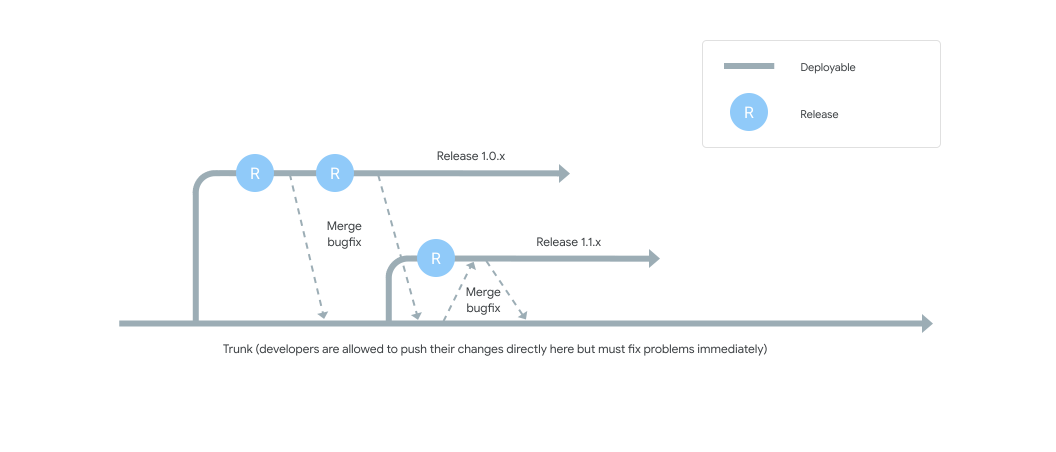
The model used for source control branching is trunk-based.
The react-rewrite branch is known to contain in-progress code, thus it cannot be touched directly.
Branch Naming Convention
When you create a branch, please use the following naming convention:
<name>/<type>
<name> is your name (you can use your GitHub name) and <type> is a concise one to three word description of the branch.
For example, if a pull request has the name noelle/docs, this indicates that the branch is created and owned by Noelle,
and the purpose of the branch is to update documentation.
Pull Request Checklist
When you create a pull request, please ensure that the following is done:
Ensure that you have forked the repository and created a branch from
react-rewitewith the correct naming conventions as mentioned above.Make sure that you have noted the changes in the
changelog.mdfile.Make sure that your PR comments describe what the changes are and follow the template
Your code is properly formatted and linted (and all workflows are passing).
Git Commit Guidelines
Use present tense and imperative mood when writing commit messages. For example,
Add new featureinstead ofAdded new feature.- Reference issues or pull requests outside of the first line.
Please use the shorthand
#123and not the full URL.
Commits that need to skip the CI workflows must be prefixed with
[skip ci].